How Do I Set up Access to FileService on macOS?
With FileService, we offer you internal university storage space that is accessible online worldwide for computers and laptops.
Note: FileService can be used within the university network. If you are not on the university premises, you will need a VPN client.
You will need:
- Your Uni-ID
- the corresponding password
Here's how to connect to the new path in just a few steps:
Step 1:
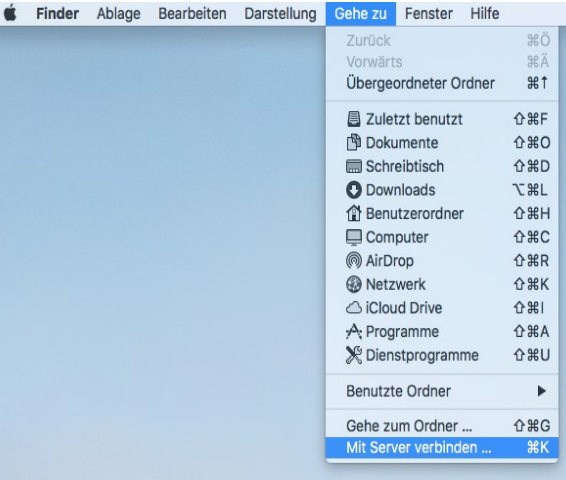
Select Finder and choose “Connect to server...” from the “Go to” menu.
Alternatively, use the keyboard shortcut +K.
Step 2:
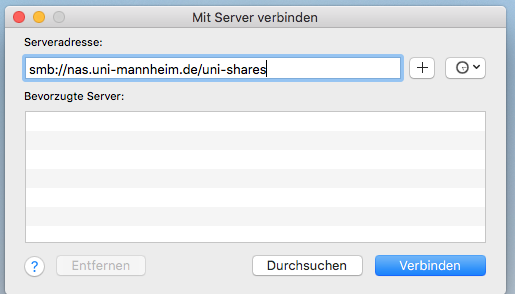
Enter the following under server address and click on “Connect”:
- Employees: smb://nas.uni-mannheim.de/uni-shares
Step 3:
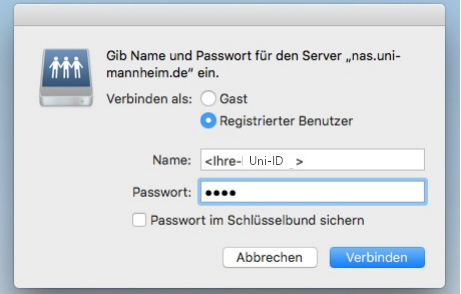
Under “Connect as” select the option “Registered user” and enter your Uni-ID and the corresponding password. If you click on “Connect” you are connected to the server and have access to all Shares that have been shared with you.