
Office 365
As of 1 May 2021, Microsoft changes the basics of its licensing model: Up to now, it was possible for employees to simultaneously use multiple Office Professional Plus installations (for example Office 2016 or Office 2019). From now on, this will be considered a breach of the licensing agreement. Each user may only have one Office Professional Plus installation on one work device. If you use several work devices and additional versions, you have to decide on a device and a version.
Please note that Office Professional Plus isonly available for Windows. If you use macOS, switching to Office 365 is mandatory, even if you need only one version for one device.
From now on, Office 365 will become the new standard. For work-related use, Office 365 may be installed on up to 5 computers or notebooks, 5 smartphones and 5 tablets.
How to find out which Professional Plus versions are installed on my device
Use the right mouse button to click on the Windows icon at the left-hand side of the task bar.

Select “apps and features” in the menu.
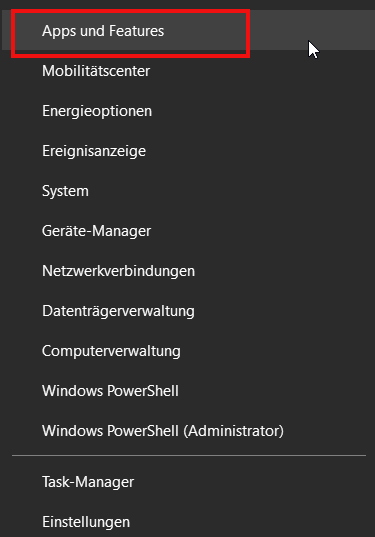
The list that will appear contains all applications which are currently installed on your device. If you want to filter the applications shown, you may use the keyword “Office”.
If you use several work devices, please carry out this check on every device.
Can I continue to use Office Professional Plus?
If you need to continue to work with an Office Professional Plus version, please contact your personal IT support or write an e-mail to itsupportuni-mannheim.de. You can also call +49 621 181-2000.
Please note: Each user may only have ONE Office Professional Plus installation on ONE WORK DEVICE. If you use several work devices and additional versions, you have to decide on a device and a version. Office Professional Plus is only available for Windows. If you use macOS, switching to Office 365 is mandatory, even if you need only one version for one device. Instructions on how to install Office 365 are available on our website under Installing Office 365 on a macOS Device.
What do I need to know if I have installed Visio and/
or Project? In these cases, please contact your personal IT support or write an e-mail to itsupportuni-mannheim.de. You can also call +49 621 181-2000.
How to uninstall additional versions
Please get more information on the applications installed by following the instructions under “How to find out which Professional Plus versions are installed on my device”.
To uninstall the version, please click on the application and select “Uninstall” in the window that opens.
Setup will then begin. In some older version, an additional window might open. If this is the case, please select “Uninstall” once again.
How to install Office 365
All Office applications are available to you through Microsoft 365. You can find detailed instructions on installation and setup on the M 365 pages.