
OneDrive


OneDrive is a cloud storage system where you can store your files and share them with others. You can create Word, Excel, PowerPoint, and OneNote documents directly in OneDrive. You can access OneDrive via your browser as well as via Teams or the desktop app. Please see the information on data protection and use.
You can only use OneDrive while you are a member of the university. Therefore, please make sure to back up your data before you leave the university.
FAQs
How do I open OneDrive in my browser?
Open OneDrive in your browser and sign in.
Wie öffne ich OneDrive über Teams?
Within Teams, you'll find the “OneDrive” tab on the left side of the menu bar or under “Show more apps.” You can use it to access the files you've stored there.
How do I open OneDrive as a desktop app?
- Download the OneDrive app. For macOS, you can find the app in the Mac App Store.
- Launch the app, enter the email address for your University of Mannheim M365 account, and click “Sign In.”
Employees: Uni-ID@uni-mannheim.de (replace “Uni-ID” with your personal Uni-ID)
Students: Uni-ID@students365.uni-mannheim.de (replace “Uni-ID” with your personal Uni-ID) - Now enter your password.
Employees: the password
associated with your Uni-ID. Students: the password you set when creating your University of Mannheim M365 account - Select a storage location. Confirm the suggested location in your local user directory by clicking “Next.”
- You will then be asked if you want to sync the files on your desktop, in the Documents folder, and in the Pictures folder with OneDrive. These are all selected by default. If you do not want this, you can deselect them by clicking on the respective icon. Confirm your selection by clicking “Continue” or “Skip.”
How do I share files with others?
If you want to share files or folders with others:
- In the relevant line, click on the entry in the “Sharing” column.
Desktop app: Right-click on the file → OneDrive → Share - You can create a link giving access or grant direct access in the menu which opens.
In both cases, you can adjust the sharing permissions.
- In the relevant line, click on the entry in the “Sharing” column.
How do I stop sharing documents?
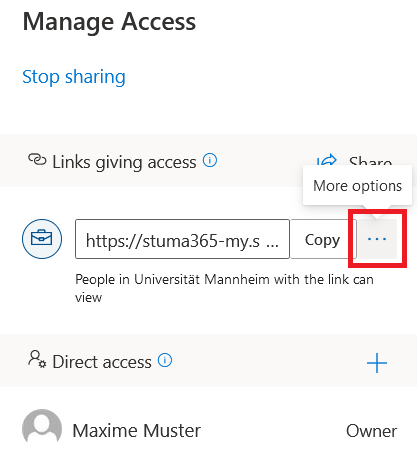
Navigate to the “Manage Access” menu and click on “More options” under “Links giving access” to see more access information.
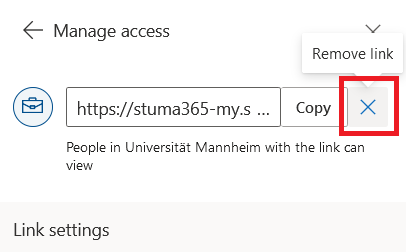
Click on the cross next to the link to revoke access. Confirm the action and click on “Delete link.”
How do I get notified about files shared with me?
You will receive an e-mail notification if someone shares a document with you. If you click on the link in this e-mail, you will be forwarded directly to the shared document.
In OneDrive, there is a “Shared” menu option. There you will find all documents shared with you.
How can I store my files with encryption?
For data encryption, we recommend the free application Cryptomator. For information on how to use this application, please see the instructions for Cryptomator.
For more information on OneDrive, please see
the official Microsoft guides.